


Heather Miller
Updated 9:29 AM CDT, Fri October 2, 2026
Published Under: Business Banking Client Resources Digital Banking Financial Education Fraud Watch Treasury Management
![How to Tell if a Bank Website Is Fake[Draft]](/uploads/blog/3b6a7f8c2d365753fc39b5af5e427c74.png)
As a bank marketing director and the main owner of our company’s website, one of my jobs is to watch out for imposters spoofing our bank’s official online presence.
Every bank is vulnerable to being spoofed. What is spoofing? It's when cybercriminals try to set up fake bank websites, social media pages, emails, and other digital channels to trick unsuspecting targets into engaging.
According to American Banker, at least 20% of banks experience spoofing or "website impersonation attacks."
A fake or spoofed website is set up to look just like your bank's website, but it is owned and managed by cybercriminals looking to steal credentials, personal information, or money. Duped bank websites are designed to target both consumers and to harvest business user IDs, passwords, and personal information that will then be used to move money.
That’s why vigilance is key.
Spoofed websites are often run by crime syndicates operating sophisticated, multinational businesses. These crime rings are difficult to trace due to foreign locations and domain registration masking.
Here’s how it works:
They find the targets: There’s a good chance that at least some of your personal information is on the dark web. This is the encrypted, anonymous part of the internet not indexed by search engines. So even if your bank hasn't technically been breached, criminals have ways of finding information about you through both legitimate and illegitimate sources.
They set the trap: In the case of spoofed websites, criminal hackers scrape the front-end code that makes a website look the way it does. They then copy and paste that code to build a new website with visuals that look nearly identical to the original, adding pages of their own to capture our information.
They put out the bait: The method we’ve all heard of is phishing or perhaps smishing (phishing by SMS). You might receive an email or text message from someone pretending to be your banker saying you have an urgent account-related message and need to log in immediately using a link to the spoofed website. If you’re not paying close attention, this is where they get you.
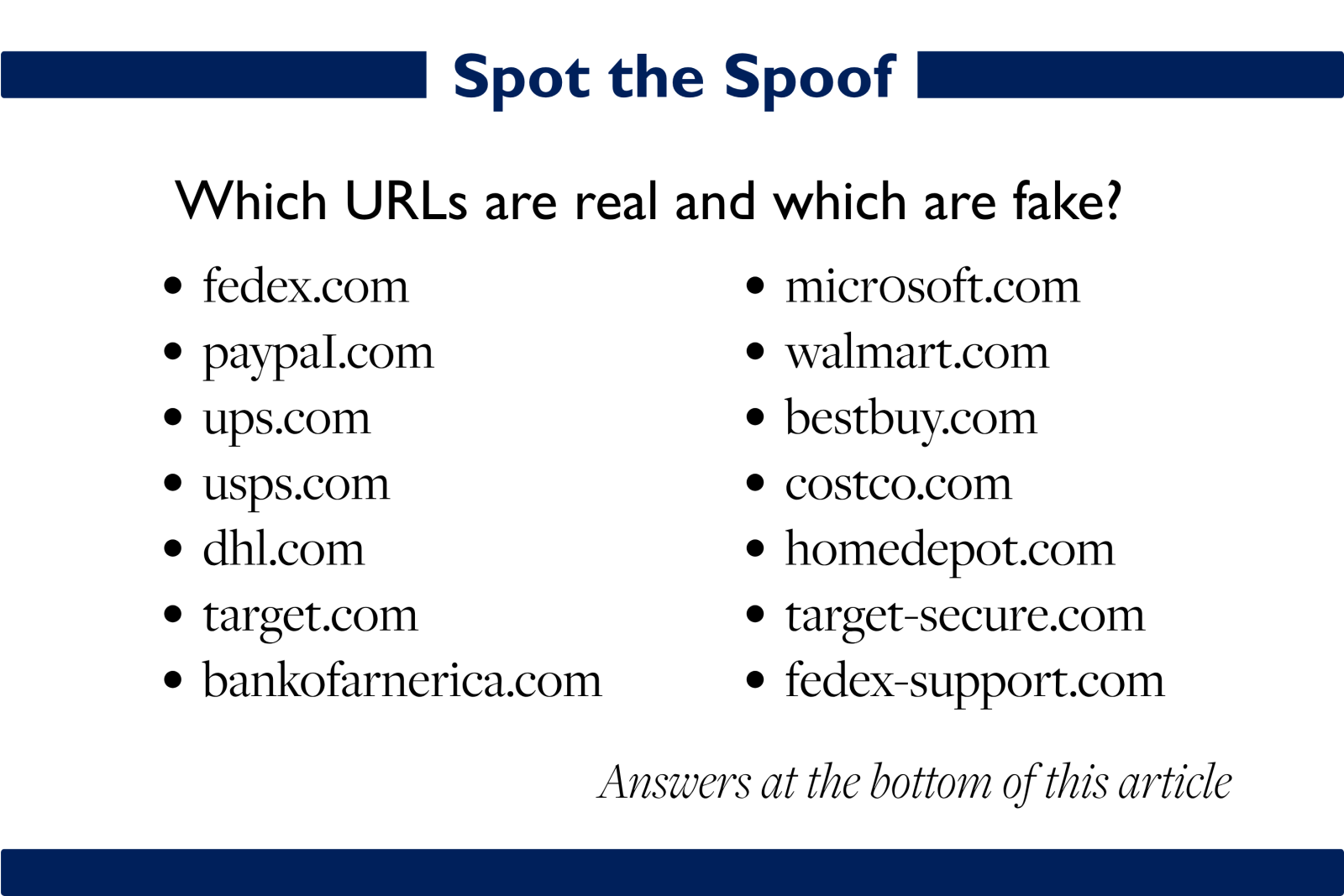
But capturing cyber prey isn’t just limited to phishing and smishing. There are now countless tricks for getting you to visit a fake website. Another common method is search engine optimization (SEO) poisoning, when criminals pay to boost brand keyword searches linking to fraudulent pages. There’s also typo squatting, when criminals register domain names that look like commonly mistyped URLs from other brands in the hopes that you’ll mistakenly type it in. Think google.com with an extra o or a 0 in the place of an o. Or googe.com.
It’s not always easy to spot fakes anymore. With AI, they’re getting better every day. Still, there are things you can watch for.
The first line of defense: That thing about pausing, or “taking a beat,” is super important. Before clicking on a link, downloading an attachment, entering login info, or sharing personal data, take a deep breath and check the sender's email address and the link itself to make sure what you are going to matches what displays when you hover your mouse over that part of the email.
If “ABC Bank” sends you an email asking you to visit their site, the sender and the link should have abcbank.com in the sender address and the link address (URL), not something completely different or even something with a single added digit like abcb0nk.com or abcbank1.com.
Remember #BanksNeverAskThat: If you receive any suspicious email, phone call, or text asking for your login credentials, a security code you didn't request, or any other sensitive information, remember that banks never ask for these things. If this happens, contact your bank directly.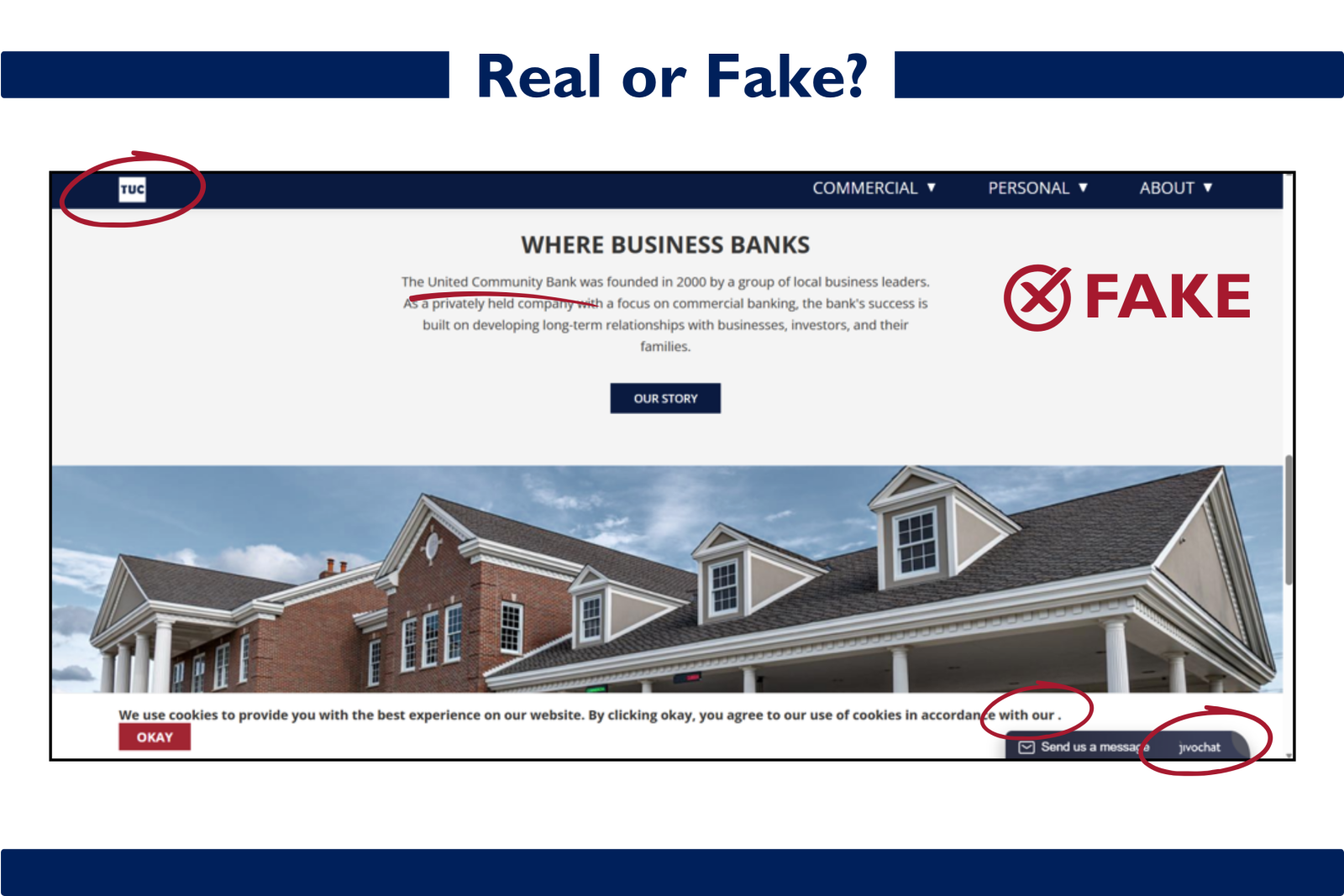
Being reasonably cautious is important in every aspect of life and finances. But, mistakes will happen. Hackers are lying in wait for those moments.
So, what else can you do?
Set up mistake-proofing layers of protection with multifactor authentication and passkeys. Also, remember: Never share a secure code sent to you that you didn’t request.
Contact your bank immediately and let them know.
At ACBT, we follow strict protocols to protect our customers’ security and involve federal agencies like the FBI and the FBI's Internet Crime Complaint Center, IC3 to investigate.
As a bank marketing director, I know that trust in our digital communications matters.
These tools aren’t the crime themselves. They are necessary tools that help us live our daily lives. The goal is to exercise caution and keep your eyes open to protect yourself.
Fraud is front of mind for us in the age of AI and our staff are working hard to protect our clients. We are always looking for ways to keep you safe and informed about how to spot fraud attempts everywhere you go.
If you think you may have been targeted, please call us at our official bank phone number: (815) 338-2300. You can also reach out on our Contact page.
Every bank is vulnerable to being spoofed. What is spoofing? It's when cybercriminals try to set up fake bank websites, social media pages, emails, and other digital channels to trick unsuspecting targets into engaging.
According to American Banker, at least 20% of banks experience spoofing or "website impersonation attacks."
A fake or spoofed website is set up to look just like your bank's website, but it is owned and managed by cybercriminals looking to steal credentials, personal information, or money. Duped bank websites are designed to target both consumers and to harvest business user IDs, passwords, and personal information that will then be used to move money.
That’s why vigilance is key.
How website spoofing works
Spoofed websites are often run by crime syndicates operating sophisticated, multinational businesses. These crime rings are difficult to trace due to foreign locations and domain registration masking.
Here’s how it works:
They find the targets: There’s a good chance that at least some of your personal information is on the dark web. This is the encrypted, anonymous part of the internet not indexed by search engines. So even if your bank hasn't technically been breached, criminals have ways of finding information about you through both legitimate and illegitimate sources.
They set the trap: In the case of spoofed websites, criminal hackers scrape the front-end code that makes a website look the way it does. They then copy and paste that code to build a new website with visuals that look nearly identical to the original, adding pages of their own to capture our information.
They put out the bait: The method we’ve all heard of is phishing or perhaps smishing (phishing by SMS). You might receive an email or text message from someone pretending to be your banker saying you have an urgent account-related message and need to log in immediately using a link to the spoofed website. If you’re not paying close attention, this is where they get you.
But capturing cyber prey isn’t just limited to phishing and smishing. There are now countless tricks for getting you to visit a fake website. Another common method is search engine optimization (SEO) poisoning, when criminals pay to boost brand keyword searches linking to fraudulent pages. There’s also typo squatting, when criminals register domain names that look like commonly mistyped URLs from other brands in the hopes that you’ll mistakenly type it in. Think google.com with an extra o or a 0 in the place of an o. Or googe.com.
How can you tell the difference between a real and an imposter website?
It’s not always easy to spot fakes anymore. With AI, they’re getting better every day. Still, there are things you can watch for.
The first line of defense: That thing about pausing, or “taking a beat,” is super important. Before clicking on a link, downloading an attachment, entering login info, or sharing personal data, take a deep breath and check the sender's email address and the link itself to make sure what you are going to matches what displays when you hover your mouse over that part of the email.
If “ABC Bank” sends you an email asking you to visit their site, the sender and the link should have abcbank.com in the sender address and the link address (URL), not something completely different or even something with a single added digit like abcb0nk.com or abcbank1.com.
Remember #BanksNeverAskThat: If you receive any suspicious email, phone call, or text asking for your login credentials, a security code you didn't request, or any other sensitive information, remember that banks never ask for these things. If this happens, contact your bank directly.
Here are other things you can watch for:
- Check the logo: In the example at the top of this article, you’re looking at a logo from an actual website spoof. Similar shape and colors of the bank’s logo but with different words. When you’re rushing to login because you fear your accounts were compromised, that difference can easily be glossed over.
- Examine the website design: A spoofed site like the one I’ve referenced here can use a familiar but older version of the site design that was retired a few years ago.
- Look for errors: While we often associate fraud with poor grammar, scraped sites can have exactly the same content as an official site. Nonetheless, some of the images might be blurry and the links might be broken due to being copied from old code. One easy quick check is to mouse over the social media buttons. If the links don’t point to the bank’s real social pages, that’s a red flag.
- Inspect the URL: Go to the top of the browser where the website address displays. Does it have subtle differences from your bank’s official URL? It should match exactly or it could be a fake.
- Read domain names from right to left: Sometimes URLs look nearly identical to the original, but with one small typo or change that is easy to overlook. One example would be a domain like amcommbank.com or amocmbank.com or amcombank.net. None of these are our official bank URL. But if you are in a hurry, you can overlook these small details. A trick for spotting these typo squatting domains is to read from right to left. This forces you to slow down and look at every character to make sure it all looks accurate.
- Verify the contact info: Do you know your bank's official customer service number and the mailing address of their HQ? If not, you should memorize it or at least know where to find it to spot spoofs faster. For example, ACBT’s official phone number can be found in our website header: (815) 338-2300.
Other defense tactics
- Verify suspicious URL with the FDIC. Like other legitimate banks, ACBT is insured by the Federal Deposit Insurance Corporation, or the FDIC. With the FDIC’s BankFind tool, you can find FDIC-insured banks going back to 1934. Here, you can add the suspect bank’s URL. The results will show you the date a bank became insured, the certificate number, the headquarters address, and the primary website URL. If no results are shown, this is a red flag. When I searched the URL of a known spoof website, it came up empty.
- Type in a known URL instead of clicking: If you are suspicious of a request to click a link in an email directing you to what you think is your bank’s website, type in the known link directly (i.e. amcombank.com) to get to the real site.
- Use a password manager: A password manager is a software tool that saves your user IDs and passwords in an encrypted vault, so you can find them when you need them, but hackers cannot. The beauty of keeping your passwords in a secure vault is that when you access a website to log in, the password manager will not work if the URL you are accessing doesn't match the one you have on file. You therefore won’t autofill your credentials if the URL isn’t legitimate.
- Verify requests on your own: Rather than clicking on a link in a suspicious email, use a different channel like visiting your bank’s website on your own and logging in to see if you received any secure messages on the legitimate banking platform.
- When in doubt, contact your bank: Reach out via your bank’s official, known channels or contact your personal banker directly to verify. We are here to help. These tactics only take an extra minute of your time and can save you months or years of grief.
What doesn’t always work
- HTTPS in the URL: Years ago, one of the first things to ask when assessing the security of a website was whether it had HTTPS:// and a padlock in the URL, rather than just HTTP://. The "s" indicates that the site encrypts information between my browser and the website. But, having the SSL certificate that gets a website that "s" in the http does not prove that a website is legit. This is because even crime rings can get HTTPS certificates. I can tell you that one of our spoofed websites has HTTPS:// in the URL. So that security check failed.
- Asking AI about known frauds: I’ll be honest, this is actually one I like to use. For example, when I get an email from an unknown sender asking me to take some kind of action, I always ask ChatGPT, “is this a known scam?” My IT department tells me this is NOT an airtight method. “They get it wrong quite a bit,” said our manager of IT security, who noted that AI for cybersecurity is notoriously pretty weak unless it's via a large language model (LLM) designed for security. But most people don't have access to these types of sophisticated enterprise tools.
- Using a security scan tool: Many fraud resources – especially the generative AI overview answer in search engines - recommend using free URL checker tools to perform cursory security scans. To research this article, I asked Google to suggest the best URL checking tools and tried every one it recommended. All of them reported that a URL I know is spoofing our bank’s website came back 100 percent clean. Be wary of this method, as a check of a proven dupe can provide a false sense of confidence.
- Checking the domain’s age: Another thing that is often recommended is to look at the site's domain age. The logic is that scam and phishing websites have very short lifespans and were often set up weeks or even days before you received a phishing email asking you to log in. But in my example, this tool tells me that one of our known spoof sites was registered in May of 2022, making it 4 years old. This information is only useful if you know the registration of your legitimate bank’s website and can compare (ACBT’s website was registered in September of 1999). If you’re going to use this tactic, make sure you compare with the real website’s domain age.
Mistake-proof your life
Being reasonably cautious is important in every aspect of life and finances. But, mistakes will happen. Hackers are lying in wait for those moments.
So, what else can you do?
Set up mistake-proofing layers of protection with multifactor authentication and passkeys. Also, remember: Never share a secure code sent to you that you didn’t request.
What to do if you think your bank's site has been spoofed
Contact your bank immediately and let them know.
At ACBT, we follow strict protocols to protect our customers’ security and involve federal agencies like the FBI and the FBI's Internet Crime Complaint Center, IC3 to investigate.
Protect Yourself
As a bank marketing director, I know that trust in our digital communications matters.
These tools aren’t the crime themselves. They are necessary tools that help us live our daily lives. The goal is to exercise caution and keep your eyes open to protect yourself.
American Community Bank & Trust is here to help
Fraud is front of mind for us in the age of AI and our staff are working hard to protect our clients. We are always looking for ways to keep you safe and informed about how to spot fraud attempts everywhere you go.
If you think you may have been targeted, please call us at our official bank phone number: (815) 338-2300. You can also reach out on our Contact page.
AI Disclaimer: This original article was created by a human writer with minor research, proofing, and fact-checking using generative AI tools.
Answer Key for Spot the Spoof:
- fedex.com - Real
- paypaI.com - Fake: The last character is a capital I, not a lowercase l in PayPal.
- ups.com - Real
- usps.com - Real
- dhl.com - Real
- target.com - Real
- bankofarnerica.com - Fake: The m in "america" has been replaced with rn, a common typo squatting trick.
- micr0soft.com - Fake: The letter o has been replaced with the number 0.
- walmart.com - Real
- bestbuy.com - Real
- costco.com - Real
- homedepot.com - Real
- target-secure.com - Fake: Adding words like secure, login, or verify to a trusted brand name is a common spoofing tactic.
- fedex-support.com - Fake: Adding words like support, account, or help can make a fraudulent domain seem legitimate.